

Download iHTTP – Install Apache, PHP & MySQL on macOS in One Click
iHTTP is a compact, purpose‑built utility that bundles the three core web‑development components—Apache, PHP and MySQL—into a single, easy‑to‑manage package for macOS users. Instead of hunting down separate installers, wrestling with configuration files, or troubleshooting version mismatches, iHTTP delivers a unified interface where each service lives on its own tab. The program lets you start, stop, restart, or uninstall any of the three environments with a single button press. While the UI is intentionally simple rather than flashy, the real power lies in the speed and reliability of getting a full LAMP‑like stack up and running on a Mac without any command‑line gymnastics. Whether you are a student learning web programming, a freelancer needing a local testing server, or a small team looking for a lightweight development environment, iHTTP removes the friction of manual setup and lets you focus on coding.
Key Features & Benefits of iHTTP
- All‑in‑One Installer: Deploy Apache, PHP and MySQL together with a single download.
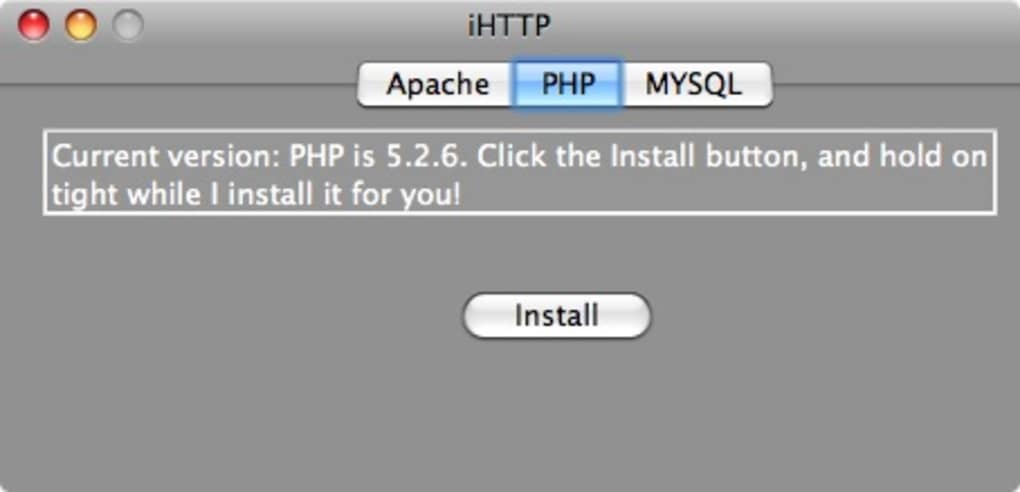
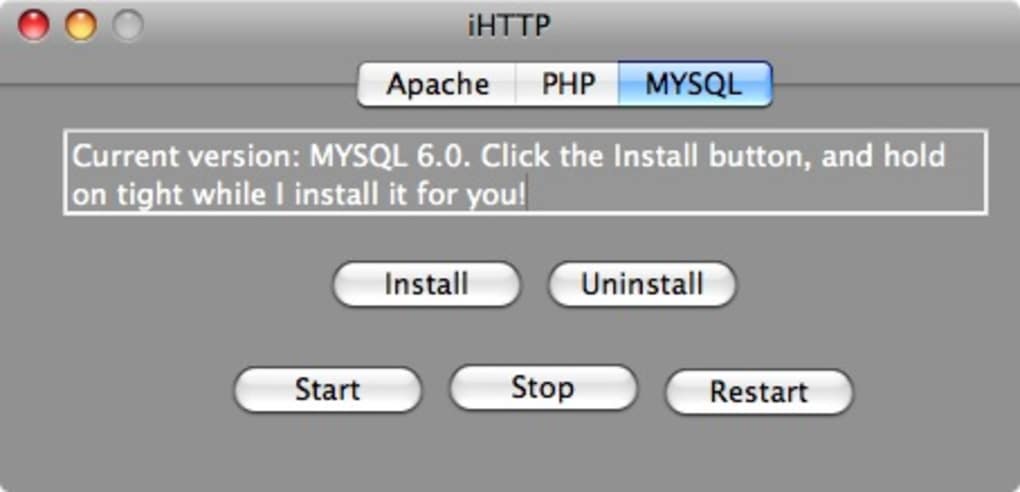
- Three Dedicated Tabs: Separate panels for Apache, PHP and MySQL simplify configuration and monitoring.
- One‑Click Controls: Start, stop, restart, or uninstall each service with intuitive buttons.
- Automatic Configuration: Pre‑configured default settings work for most development scenarios, eliminating manual edits to httpd.conf or my.cnf.
- Lightweight Footprint: The package occupies minimal disk space compared with full XAMPP or MAMP installations.
- Secure Updates: The application checks for new releases and prompts you to download the latest stable version.
- Uninstall Simplicity: Removing any component is as easy as selecting the environment and clicking “Uninstall.”
- Free for Personal Use: iHTTP can be downloaded and used without a license key for non‑commercial projects.
Installation, Usage & macOS Compatibility
Getting iHTTP up and running takes just a few minutes. First, visit the official website and click the Download iHTTP button. The installer is a standard .dmg file that works on macOS 10.13 (High Sierra) and newer, including the latest Apple Silicon (M1/M2) machines. After mounting the disk image, drag the iHTTP icon into your /Applications folder. The app will prompt you for administrator privileges the first time you start a service—this is required because Apache and MySQL need to bind to privileged ports.
Once launched, you will see three tabs labeled Apache, PHP, and MySQL. Each tab contains a status indicator, a start/stop button, and a restart option. To begin a development session, simply click Start under Apache; the web server will launch on http://localhost. Switch to the PHP tab to verify that the interpreter is active—iHTTP automatically links PHP to Apache, so you can place .php files in the default /Library/WebServer/Documents folder and view them instantly. Finally, open the MySQL tab, start the database service, and use the built‑in credentials (username: root, password: empty) or configure a custom password via the settings button.
Compatibility extends beyond the base OS version. iHTTP detects whether your Mac runs on Intel or Apple Silicon and selects the appropriate binary for each component. It also respects macOS security policies, prompting you to allow network access in System Preferences → Security & Privacy → Firewall if necessary. For developers who need a specific PHP version, iHTTP includes a dropdown to switch between the bundled 7.x and 8.x releases, ensuring that your code runs against the right interpreter without manual recompilation.
Pros, Cons & Frequently Asked Questions
Pros
- Fast, single‑click installation of three essential web services.
- Unified UI reduces the learning curve for beginners.
- Works on both Intel and Apple Silicon Macs.
- Light on system resources compared with full‑stack solutions.
- Free for personal and educational use.
Cons
- Interface is functional but not visually polished.
- Lacks advanced configuration options for power users.
- No built‑in support for additional modules like phpMyAdmin.
- Updates are manual; automatic background updating is not available.
- Only available for macOS; Windows or Linux users must look elsewhere.
FAQ
Is iHTTP compatible with the latest macOS Ventura?
Yes. iHTTP has been tested on macOS Ventura (13.x) and runs natively on both Intel and Apple Silicon hardware.
Can I change the default MySQL root password?
Absolutely. After starting MySQL, click the gear icon in the MySQL tab, choose “Edit Configuration,” and set a new root password. The change is saved to the underlying my.cnf file.
Does iHTTP support PHP extensions like GD or cURL?
The bundled PHP builds include the most common extensions, including GD, cURL, OpenSSL, and PDO. If you need a custom extension, you can manually edit the php.ini file located in the iHTTP resources folder.
How do I completely remove iHTTP from my Mac?
Open iHTTP, go to each tab (Apache, PHP, MySQL), and click the “Uninstall” button. After all services are removed, drag the iHTTP application from the /Applications folder to the Trash and empty it.
Is there a paid version with more features?
Currently iHTTP is offered as a free tool. The developer has indicated that future premium features may include a graphical phpMyAdmin integration and automated backup utilities, but no paid tier is available at this time.
Conclusion – Get iHTTP Up and Running Today
If you’ve ever felt frustrated by the fragmented process of installing Apache, PHP and MySQL separately, iHTTP provides a refreshingly simple solution for macOS developers. Its single‑click workflow, low resource consumption, and clear separation of services make it an ideal choice for students, freelancers, and small teams who need a reliable local environment without the overhead of larger stacks. While power users may miss some advanced configuration knobs, the core functionality is rock‑solid and the free price tag is hard to beat. Download iHTTP now, launch the three services in seconds, and start building your next web project on a stable, locally hosted LAMP‑style platform.







